

Securely Connecting Services with Azure Front Door and Application Gateway
How can Azure Front Door and Azure services be connected using Private Link? This post explains how Azure Front Door integrates with Application Gateway and other Azure services, ranging from public FQDNs to fully private Private Link scenarios.
Introduction
Following the official announcement on February 28, 2023 regarding the end of the V1 SKU of Application Gateway, this blog post focuses on the specifics of the V2 Application Gateway.
Azure Application Gateway is one of the central building blocks when it comes to securely, scalably, and controllably deploying web workloads in Azure. As a Layer 7 load balancer, it provides features such as TLS termination, URL-based routing, Web Application Firewall (WAF) integration, and integration with various Azure services.
In practice, the key question is less about what Application Gateway can do and more about how it is used in combination with public and private IPs, other Layer 7 load-balancing solutions such as Front Door, and strict security requirements using Private Link.
For this reason, this blog post focuses on common deployment variants, the decision between public and private listeners, connecting Azure Front Door via Private Link, and the possibility of deploying Application Gateway fully privately without a public IP in special scenarios.
Azure Application Gateway in Combination with Azure Front Door
In enterprise scenarios, application users are rarely located in a single region. To address this, individual resources or entire landing zones are duplicated across multiple regions. A common central entry point is an Azure Front Door instance combined with a Web Application Firewall (WAF).
To ensure that users are routed to the correct Azure region based on their location, multiple Front Door origins can be configured within an origin group, pointing to the respective Application Gateway instances in each region. The connection between Front Door and Application Gateway can be implemented in several ways, which are described below.
Variant 1 – Forwarding to Public FQDNs
The following diagram illustrates multiple origin groups that use only the public FQDNs of the respective services. This approach leverages service tags to restrict access to specific subnets and the Allow Trusted Services option for platform services such as Key Vaults, App Services, or Storage Accounts.
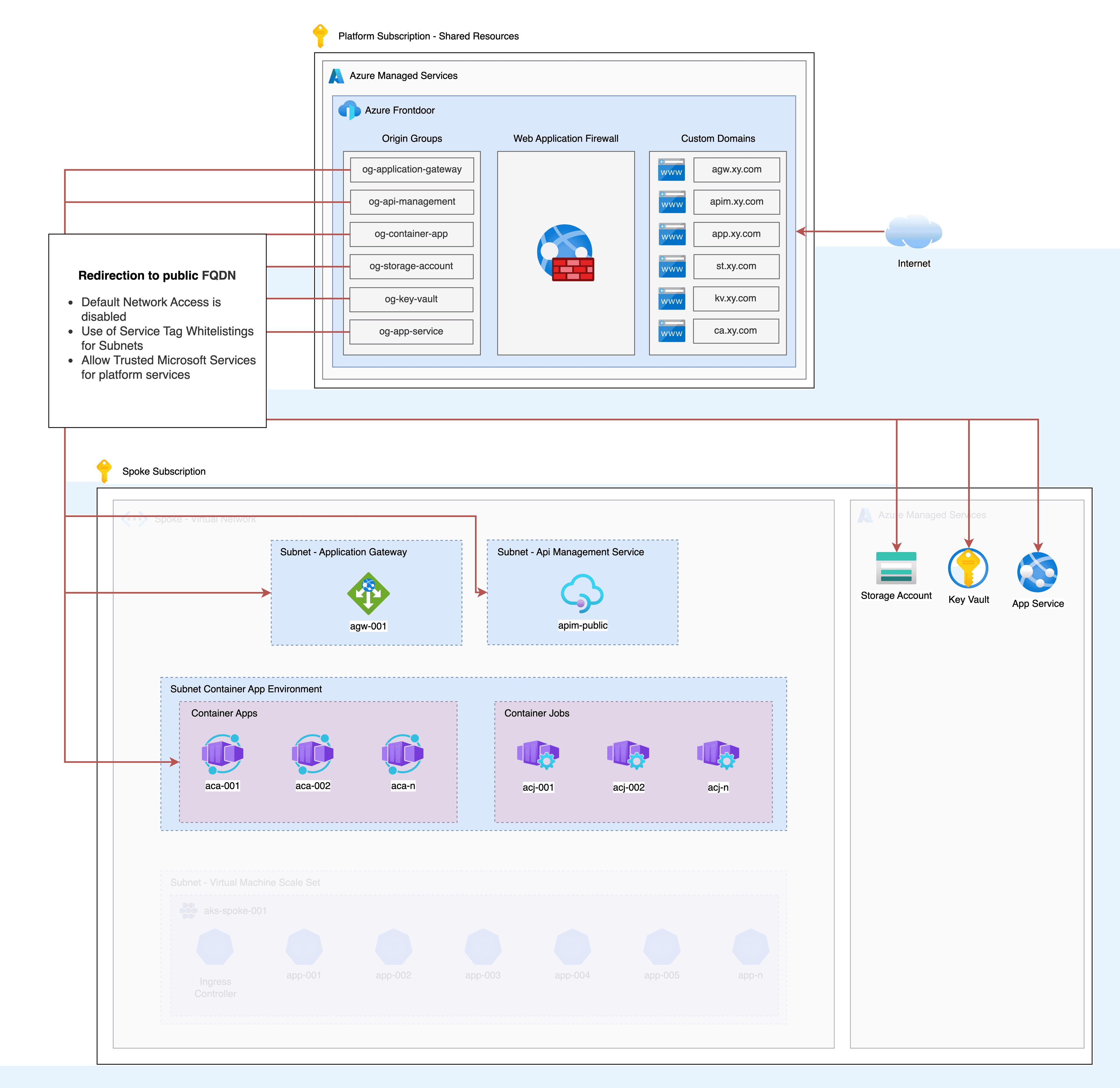
This solution requires no special configuration and can be implemented in environments with less strict requirements. However, for highly regulated enterprise scenarios, this approach is often not sufficient, which is why additional options are outlined in the following variants.
In the context of Application Gateway, Front Door forwards traffic to a specific listener that has a public IP address. Forwarding traffic to a listener with a private IP is not possible in this scenario without additional configuration steps.
Variant 2 – Forwarding Using Private Link
The connection between Front Door origins and the respective services can also be established without using a public IP or the associated default FQDN. Instead, Private Link connections to a wide range of services can be configured directly via the Azure portal or Terraform.
Native Private Link integration is available for fully Azure-managed services such as Key Vaults, Storage Accounts, App Services, or Container Apps. There is also broad support for resources deployed into delegated subnets within a virtual network.
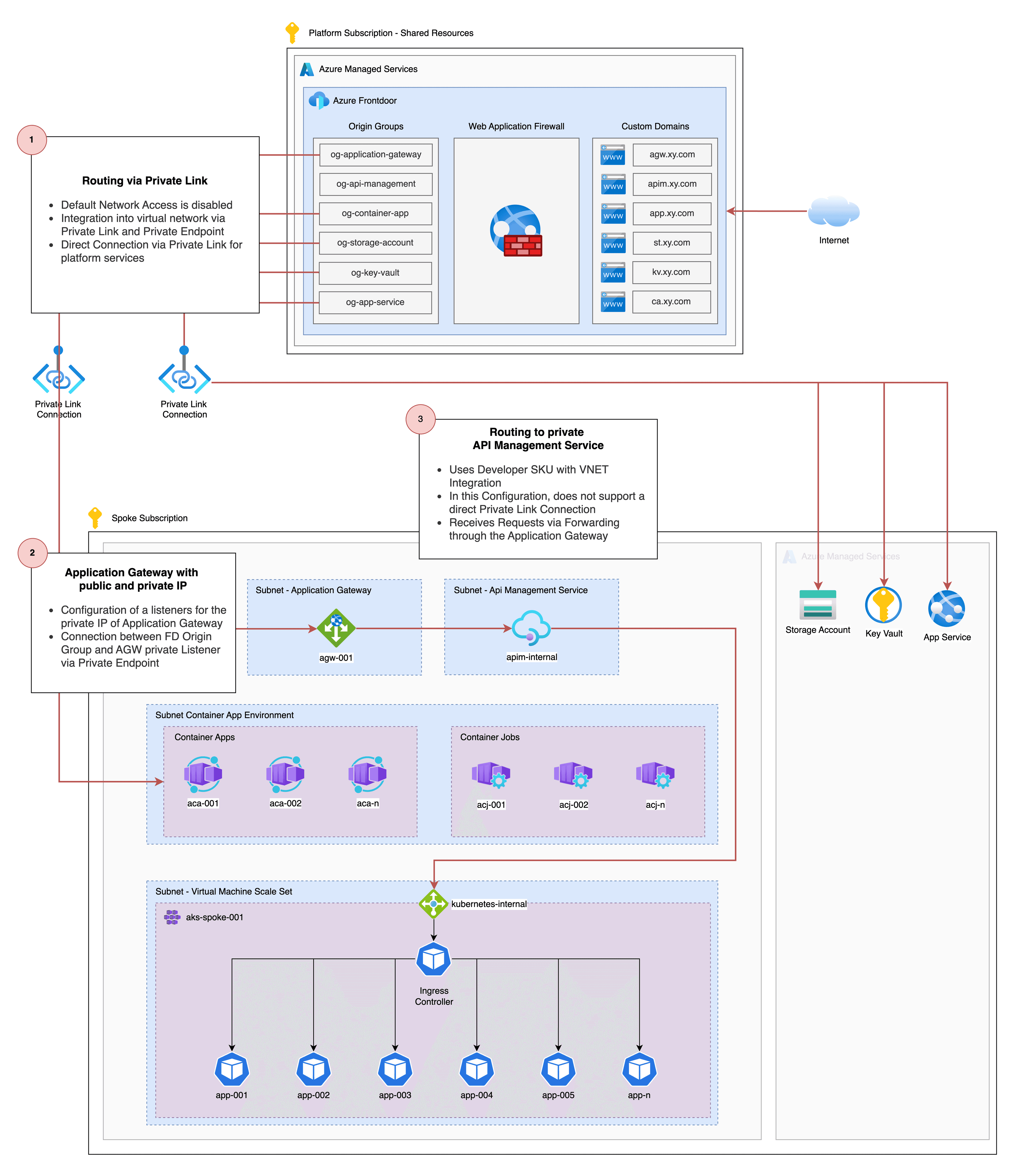
A key difference for services such as Application Gateway or API Management is that, unlike in the first variant, traffic is not routed to the public IP of the service. Instead, Private Link is used to forward traffic directly to the private IP within the virtual network.
For Application Gateway, listeners can be configured for both public and private IP addresses, which then route traffic to the respective applications within the virtual network using path-based routing. Although a Private Link connection between Front Door and a public IP listener is technically possible, it is generally more sensible to connect Front Door directly to the private IP listener.
An important aspect during configuration is following the official Application Gateway setup guidance. This is necessary because the hostname of the custom domain used by the Application Gateway listener must be explicitly passed through Front Door to ensure reliable name resolution.
For detailed configuration steps, the following resources are highly recommended:
- https://learn.microsoft.com/en-us/azure/application-gateway/private-link-configure?tabs=portal
- https://learn.microsoft.com/en-us/azure/frontdoor/how-to-enable-private-link-application-gateway?pivots=front-door-portal
- https://tech-blog.cloud-config.jp/2025-02-14-azure-frontdoor-privatelink-applicationgateway
- https://ops-today.com/topics-6897/
Additionally, it is worth highlighting a specific limitation of the API Management service: Direct connectivity between Front Door and API Management is only supported in the most expensive SKU. In particular, when VNet integration is required, only the Developer or Premium SKU can be deployed.
If neither the SLOs nor the throughput of the Premium SKU are required, traffic can still be delivered entirely via Private Link. As illustrated in the diagram below, traffic is forwarded from Front Door to the private listener of the Application Gateway. Since the traffic is already within the virtual network at this point, it can then be routed to a private API Management service deployed in a delegated subnet without a public IP.
Conclusion
The combination of Azure Front Door and Application Gateway is not required for every cloud environment, but it does offer valid use cases that should be considered. I hope this blog post has highlighted relevant details and potential challenges. The linked resources should provide additional guidance for your next implementation.